



Talk with Our Production Équipe
Bonjour! We just need a few bits of information, and then a manufacturing expert will reach out to you directly to see how we can partner on a future production project.
Merci ! We've received your request and a member of our team will reach out shortly.
Catalogue de production
Streamline your transition from prototyping to full-scale production effortlessly
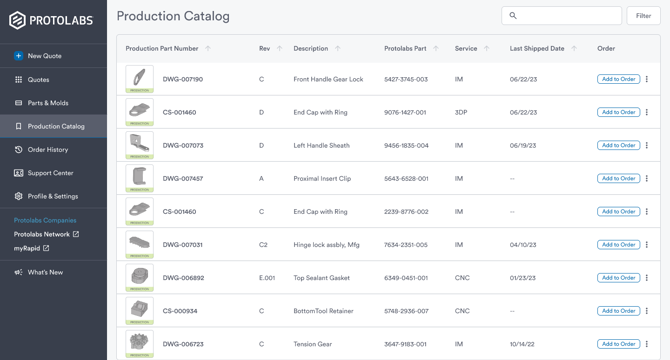
Using our award-winning quoting platform for production parts has never been easier. Our Catalogue de production allows you to manage, organize, share, and reorder your production-ready parts efficiently, eliminating complications.
Customers can now identify specific parts to be added to the Catalogue de production, which team members can then access for easy reordering. Elevate your production workflow today.
Frequently Asked Questions
What is the Catalogue de production?
expand_less expand_moreThe Catalogue de production helps you and your team transition parts from prototyping to production. Many preliminary versions of your parts are created during the prototyping phase. Once product design and specifications are finalized, the Catalogue de production helps your team identify, organize, share, and reorder production-ready parts.
Cataloging a part allows you to assign production part numbers, revisions, and descriptions, standardizing naming conventions to improve order accuracy. In addition, cataloging parts helps prevent accidental changes to specifications and designs.
What happens when I catalog a part?
expand_less expand_moreCataloging a part will distinguish production-ready parts from prototyping variants. When you catalog a part, we create a 1-to-1 relationship between your part number and our Protolabs 11-digit part number. Once cataloged, the part will appear in the Catalogue de productions of all team members who have access to that part. In addition, parts that are cataloged will have their configuration locked to prevent accidental changes.
Does cataloging affect how my part is manufactured?
expand_less expand_moreNo. We manufacture all parts based on your specifications. The Catalogue de production is a tool for identifying, naming, and organizing production-ready parts but does not affect our manufacturing processes.
Do I have to use the Catalogue de production to order my production parts?
expand_less expand_moreNo. The Catalogue de production is a tool to reorder your production parts in an easy and reliable way across team members. You can continue to order parts from Protolabs without using the Catalogue de production.
How do I catalog a part?
expand_less expand_moreThere are many opportunities within the platform where you may catalog a part. This feature is found on all part option menus and is labeled "Catalog for Production". When cataloging a part, you will be asked to assign your part number, revision, and description. Once cataloged, the part will be labeled as a production part to all team members who have access to the part.
Can I change the production part number and revision in the future?
expand_less expand_moreYes. If you need to update the part name, you can edit the assigned part number, revision, and description under your part options.
If the part configuration or design has changed, you will need to remove the old part from the catalog and add the new part in its place.
What happens if I remove a part from the Catalogue de production?
expand_less expand_moreRemoving a part from your Catalogue de production also removes it from the Catalogue de production of team members who have access to the part. It also removes the "Production" label and unlocks the configuration, allowing for part changes.
The part may still be ordered and used as it had been prior to being cataloged. If the part was removed in error, it can be re-added at any time.
How do I share my Catalogue de production with others?
expand_less expand_more- On the Catalogue de production page, click "+ Équipe Catalog".
- Name your Équipe Catalog
- Add the parts you want shared with your team to the Équipe Catalog
- Share access to your team by entering your colleagues' email addresses
- The Équipe Catalog becomes visible to everyone you shared it with
- All parts in the Équipe Catalog are shared and orderable
- Anyone with access can add, move, and order parts in the shared catalog